
Buying Facebook likes can help a business page look more established, but only if you understand what you are actually buying.
A higher like count can create a stronger first impression when someone visits your Facebook Page. That can matter for local businesses, online stores, agencies, creators, and new brands that do not want their page to look empty.
But Facebook likes are not a magic growth button.
They do not guarantee reach.
They do not guarantee sales.
They do not replace real content.
They do not fix a weak offer or an inactive page.
The smart way to use Facebook Page Likes is as a social proof signal — something that supports your page’s credibility while you continue building real content, followers, engagement, reviews, and customer trust.
This guide explains how to buy Facebook likes, what to check before ordering, how many likes to start with, and when Facebook Followers may be more useful than Page Likes.
Quick Answer: How Do You Buy Facebook Likes?
To buy Facebook likes, choose a Facebook Page Likes service, enter your public Facebook Page link, select the quantity you want, and place the order.
You should not need to share your Facebook password. For Page Likes, a public page URL is usually enough.
Example:
https://www.facebook.com/yourpageusername
The best approach is to start with a small order, review the delivery, and then increase gradually if the service matches your expectations.
If you are ready to compare available options, you can view NeoFollower’s Facebook Page Likes services here:
[Buy Facebook Page Likes + Followers]
What Does “Buying Facebook Likes” Mean?
“Facebook likes” can mean different things depending on the service.
Before ordering, make sure you know which result you actually want.
Facebook Page Likes
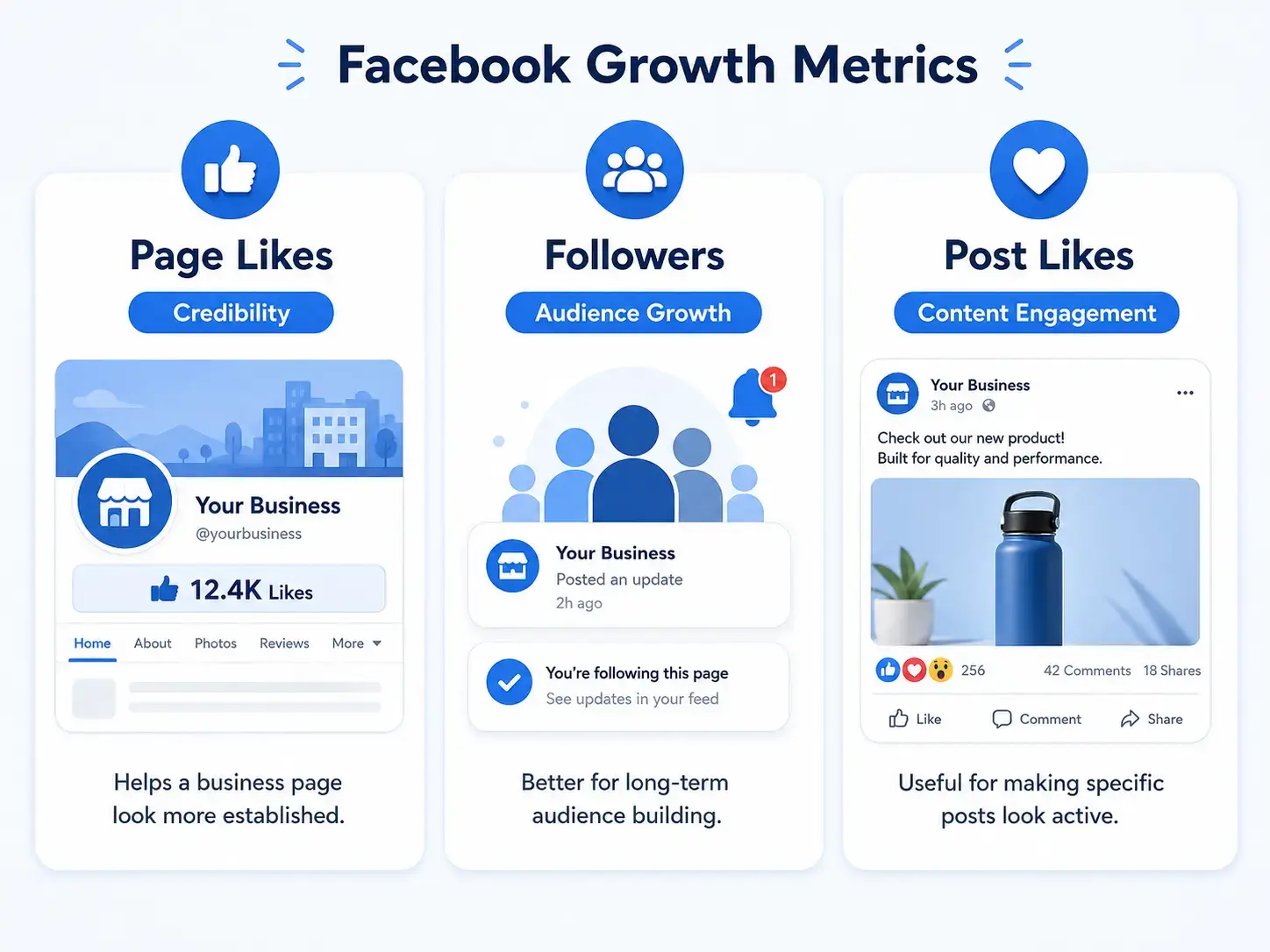
Page Likes are the classic social proof number connected to a Facebook business page.
When people say “buy Facebook likes,” they usually mean buying likes for a Facebook Page, not for a single post.
This is useful if your goal is to make your business page look more established.
Facebook Page Followers
Followers are different from likes.
Followers are more connected to future updates from your page. In newer Facebook Page experiences, followers have become a more important audience signal than likes.
If your goal is long-term page growth, followers may matter more than likes alone.
Facebook Post Likes
Post Likes are engagement on one specific post.
If your goal is to make a single offer, announcement, photo, or video look more active, post likes are more relevant than Page Likes.
Facebook Reactions
Reactions include Like, Love, Care, Haha, Wow, Sad, and Angry.
These are useful when you want a post to look more engaged, but they do not increase the total Page Like count.
Simple Comparison
| Service Type | Best For | Main Limitation |
|---|---|---|
| Facebook Page Likes | Page credibility and social proof | Does not guarantee reach or sales |
| Facebook Page Followers | Long-term audience growth | Still needs content to be useful |
| Facebook Post Likes | Making one post look active | Does not improve the whole page |
| Facebook Reactions | More natural-looking post engagement | Only affects specific content |
If your business page looks empty, Page Likes can help.
f your content is already good but nobody sees it, Followers or post engagement may be more useful.
Should You Buy Facebook Likes?
Buying Facebook likes can make sense in some situations, but it is not the right move for every page.
The main value is social proof.
When someone checks your page, the like count can influence how established your business feels. This matters most when people are comparing you with competitors, checking if your business is real, or deciding whether to message you.
Buying Facebook Likes Can Make Sense If:
- Your business page is new and looks empty.
- Customers check your Facebook Page before contacting you.
- You already have posts, branding, and business details set up.
- You want your page to look more established before outreach or ads.
- You are preparing a launch, campaign, or local promotion.
- You want to support a broader Facebook growth strategy.
Buying Facebook Likes Does Not Make Sense If:
- Your page has no posts, profile photo, cover image, or About section.
- You expect likes to create sales by themselves.
- You want guaranteed reach from bought likes.
- You are trying to cover up a weak product or bad service.
- You plan to rely only on paid social proof without real content.
- You do not understand the difference between Page Likes, Followers, and Post Likes.
The best way to think about it:
Facebook Page Likes can support credibility, but they should not be your entire marketing strategy.
Is It Safe to Buy Facebook Likes?
There is no zero-risk way to use third-party engagement services.
Meta’s policies focus on authenticity and prohibit fake accounts, misrepresentation, and artificially boosting popularity. That means you should avoid any provider that makes unrealistic promises or asks for sensitive account access.
A more careful approach is to treat Facebook likes as a social proof tool, not a shortcut to fake popularity.
Before ordering, remember:
- Do not share your Facebook password.
- Use only your public Page link.
- Read the service details carefully.
- Start with a small order first.
- Understand that drops can happen.
- Do not expect guaranteed reach, sales, or engagement.
- Keep your page active with real content.
- Use the service as one part of a broader growth plan.
The safest wording is not “buy likes with no risk.”
The honest wording is:
You can reduce problems by choosing transparent services, using public-link ordering, avoiding unrealistic promises, and keeping your page credible.
Before You Buy: Prepare Your Facebook Page First
Do not buy likes for an unfinished page.
If someone visits your page after the like count increases and sees no posts, no branding, and no clear offer, the likes will not help much.
Before ordering, check your page.
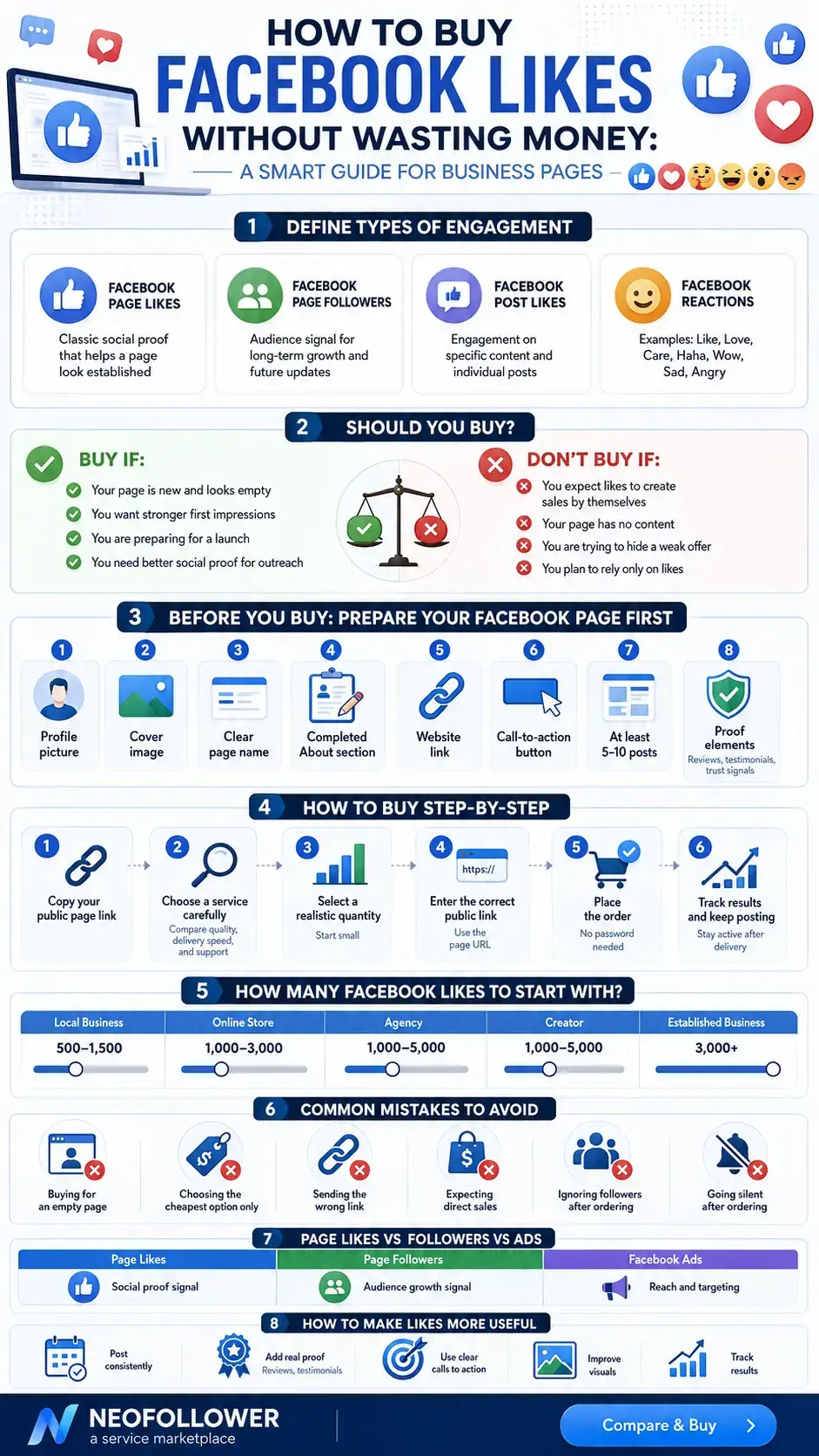
Facebook Page Readiness Checklist
- Profile photo is uploaded.
- Cover image looks professional.
- Page name is clear.
- Username is clean and easy to read.
- About section is complete.
- Website, phone number, email, or WhatsApp link is added.
- Page category is correct.
- Business location or service area is clear.
- Call-to-action button is set up.
- At least 5–10 posts are already published.
- Recent posts look real and useful.
- Reviews, recommendations, or proof are visible if available.
Think of it like preparing a store before sending people inside.
The like count may help people take the page more seriously, but the page itself still has to look worth trusting.
How to Buy Facebook Likes Step by Step
Here is the simple process.
Step 1: Copy Your Facebook Page Link
Go to your Facebook Page and copy the public URL.
A correct page link usually looks like this:
https://www.facebook.com/pageusername
Make sure you are copying the page link, not a post link, group link, personal profile link, or login page.
Step 2: Choose a Facebook Page Likes Service
Go to the Facebook Page Likes category and compare the available services.
Check:
- Price
- Minimum quantity
- Maximum quantity
- Start time
- Delivery speed
- Refill information
- Link format
- Service notes
- Support availability
You can compare available options here:
[Buy Facebook Page Likes + Followers]
Step 3: Choose a Realistic Quantity
Do not order a huge number just because the price looks attractive.
A page with 40 likes does not need to jump to 50,000 likes overnight. A smaller first order helps you check the service and see how the result looks on your page.
Recommended starting points:
| Current Page Size | Suggested First Order |
|---|---|
| 0–100 likes | 100–500 likes |
| 100–500 likes | 500–1,000 likes |
| 500–2,000 likes | 1,000–3,000 likes |
| 2,000–10,000 likes | 2,000–5,000 likes |
| 10,000+ likes | Choose based on campaign goals |
The goal is not to buy the biggest number possible.
The goal is to make your page look more credible without making the page feel strange to real visitors.
Step 4: Enter the Correct Public Link
Paste your Facebook Page URL into the order form.
Before submitting, check:
- The link opens correctly.
- The page is public.
- The page name is correct.
- You did not paste a post link by mistake.
- You did not paste a group or profile link.
- The selected service supports your link format.
Wrong links are one of the most common reasons orders fail or deliver incorrectly.
Step 5: Place the Order
After choosing the service and quantity, place the order.
For Facebook Page Likes, you should only need the public page URL. Do not share your Facebook password.
Step 6: Track the Order
After placing the order, track it from your NeoFollower account dashboard.
Delivery time depends on the selected service, service status, quantity, and Facebook’s own updates.
Check the service notes before assuming there is a problem.
Step 7: Keep Posting After Delivery
This is where many pages fail.
They buy likes, then stop posting.
That creates a weak impression because the like count increases, but the page still looks inactive.
After ordering, keep the page alive with:
- Business updates
- Product photos
- Customer reviews
- Short videos
- Offers
- FAQs
- Behind-the-scenes posts
- Educational posts
- Case studies
- Local updates
- Testimonials
The likes can support the first impression. Your content gives people a reason to trust you.
How Many Facebook Likes Should You Buy?
There is no perfect number for every page.
The right amount depends on your current like count, brand type, niche, and goal.
A local salon, an e-commerce brand, a real estate agent, and a public figure should not all use the same strategy.
Simple Quantity Guide
| Page Type | Suggested Starting Range |
|---|---|
| Brand-new page | 100–500 likes |
| Local business page | 500–1,500 likes |
| Online store | 1,000–3,000 likes |
| Agency or service business | 1,000–5,000 likes |
| Creator or public figure | 1,000–5,000 likes |
| Established business page | 3,000+ likes based on need |
A good question to ask before ordering:
“How many likes would make this page look more established without making the rest of the page look unrealistic?”
If your page is new, start small.
If your page already has posts, followers, reviews, and activity, you can choose a larger package with more confidence.
What to Check Before Choosing a Facebook Likes Service
Not every Facebook Likes service is equal.
Before you order, check these details.
1. Does It Require a Password?
For Facebook Page Likes, the answer should be no.
A public page link should be enough.
If any service asks for your Facebook password, avoid it.
2. What Is the Minimum Quantity?
Some services allow small test orders. Others require a higher minimum.
If this is your first time, choose a service that lets you test with a smaller quantity.
3. What Is the Delivery Speed?
Delivery speed can vary.
Fast delivery may be useful for small orders, but larger orders should be chosen carefully. Always read the service details before ordering.
4. Is Refill Available?
Some services include refill. Others do not.
Refill means that if eligible likes drop during the refill period, they may be restored according to the service terms.
Always check the refill note before ordering.
5. What Link Format Is Required?
Some services require a specific link format.
Usually, a Facebook Page link looks like this:
https://www.facebook.com/pageusername
If the link format is wrong, the order may be delayed, fail, or deliver incorrectly.
6. Is Support Available?
Support matters.
If something goes wrong, you need a way to ask for help, share your order ID, and understand what happened.
Common Mistakes When Buying Facebook Likes
Avoid these mistakes if you want better results.
Mistake 1: Buying Likes for an Empty Page
If your page has no posts or business details, more likes will not create trust.
Prepare the page first.
Mistake 2: Choosing Only the Cheapest Service
The cheapest service is not always the best option.
Check the service notes, refill details, speed, and limits before ordering.
Mistake 3: Sending the Wrong Link
Always open the link yourself before submitting it.
Make sure it goes to the correct Facebook Page.
Mistake 4: Expecting Likes to Create Sales
Likes can support credibility, but they do not close deals by themselves.
Sales still depend on your offer, product, content, reviews, pricing, website, and follow-up.
Mistake 5: Ignoring Facebook Followers
Facebook Followers may be more important if your goal is long-term audience growth.
For many pages, a better strategy is to combine:
- Page Likes for social proof
- Followers for audience growth
- Post engagement for active-looking content
- Real content for trust and conversion
Mistake 6: Going Silent After Ordering
A higher like count on a dead page does not help much.
Keep posting after the order.
Buying Facebook Likes vs Facebook Followers
This is one of the most important decisions.
If your goal is page credibility, buy Facebook Page Likes.
If your goal is audience growth, consider Facebook Followers.
Choose Facebook Page Likes If:
- Your page looks empty.
- You want stronger social proof.
- Customers check your page before trusting you.
- You want your business page to look more established.
- You are preparing for outreach, launch, or promotion.
Choose Facebook Followers If:
- You care more about future content visibility.
- Your page already has enough likes.
- You want to grow the audience connected to your page.
- You post regularly and want more people connected to updates.
Choose Facebook Post Likes If:
- You want one post to look more active.
- You are promoting a launch, event, or offer.
- Your page is fine, but a specific post needs engagement.
For many businesses, the strongest setup is not one service.
It is a combination of Page Likes, Followers, post engagement, consistent content, and real customer proof.
Buying Facebook Likes vs Running Facebook Ads
Buying Facebook Likes and running Facebook ads are not the same.
Facebook ads are better for traffic, leads, targeting, sales, and measurable campaigns.
Buying Page Likes is mainly for social proof and page appearance.
| Option | Best For | Limitation |
|---|---|---|
| Buying Facebook Likes | Social proof and page credibility | Does not guarantee sales |
| Buying Facebook Followers | Audience growth signal | Still needs content |
| Facebook Ads | Traffic, leads, sales, targeting | Requires budget and testing |
| Organic Content | Long-term trust | Takes time |
| Post Engagement Services | Making specific content look active | Does not build the full page |
If you have budget, content, and an offer, Facebook ads may be more powerful.
If your page simply looks empty and weak, Page Likes can help improve the first impression before you start bigger campaigns.
Why Use NeoFollower to Buy Facebook Page Likes?
NeoFollower is a social media services marketplace where you can compare Facebook Page Likes services and choose the option that fits your page.
Instead of guessing, you can review the details before placing an order.
With NeoFollower, you can:
- Compare available Facebook Page Likes services.
- Check price before ordering.
- See minimum and maximum quantities.
- Review service notes.
- Order with a public Facebook Page link.
- Avoid sharing your Facebook password.
- Track your order from your account.
- Contact support if something needs help.
This makes the process easier for business owners, creators, agencies, freelancers, and resellers.
[Compare Facebook Page Likes Services → /services/facebook/facebook-page-likes/]
Who Should Buy Facebook Page Likes?
Facebook Page Likes can be useful for different types of pages.
Local Businesses
Restaurants, salons, gyms, clinics, repair services, real estate agents, and local stores often use Facebook as a trust page.
When customers check the page, a stronger like count can make the business feel more established.
Online Stores
E-commerce brands can use Page Likes to support brand appearance before sending traffic from ads, influencers, or marketplaces.
Agencies and Freelancers
Agencies, consultants, designers, and freelancers may use Page Likes to make their business page look less empty and more established.
Creators and Public Figures
Creators, coaches, musicians, speakers, and personal brands may use Page Likes as one layer of public credibility.
New Brands
New businesses often struggle with the first impression.
Page Likes can help the page look more active while the brand builds real content, reviews, and customers.
How to Make Bought Likes More Useful
The order itself is only one part of the strategy.
To make Facebook Likes more useful, improve the page around them.
Post Consistently
You do not need to post every day, but the page should not look abandoned.
A simple schedule:
- 2–3 posts per week
- 1 short video per week
- 1 offer or product post per week
- 1 trust-building post per week
Add Proof
Show real reasons to trust you.
Examples:
- Reviews
- Testimonials
- Customer photos
- Case studies
- Before-and-after results
- Screenshots
- Press mentions
- Business milestones
Use a Clear Call to Action
Tell visitors what to do next.
Examples:
- Send a message
- Visit website
- Book now
- Call now
- Shop now
- Request quote
- Join group
Improve Visuals
Your profile photo, cover image, and post design should match your brand.
A strong page design makes the like count feel more believable and useful.
Track Results
After ordering, check:
- Page visits
- Follower growth
- Messages
- Post engagement
- Website clicks
- Leads
- Sales
- Ad performance
The goal is not just to increase a number.
The goal is to make the page support your business better.
Frequently Asked Questions
Can I buy Facebook likes?
Yes. You can buy Facebook likes by choosing a Facebook Page Likes service, entering your public Facebook Page link, selecting a quantity, and placing the order.
You should not need to share your Facebook password.
Do I need to give my Facebook password?
No.
For Facebook Page Likes, a public page link should be enough. If a service asks for your Facebook password, avoid it.
What link should I use?
Use your public Facebook Page URL.
Example:
https://www.facebook.com/pageusername
Do not use a post link, group link, personal profile link, or login link unless the selected service specifically asks for it.
Are Facebook Page Likes the same as Facebook Followers?
No.
Page Likes are mainly a social proof signal. Followers are more connected to future page updates and long-term audience growth.
Should I buy Facebook Likes or Facebook Followers?
Buy Facebook Page Likes if your goal is visible page credibility.
Choose Facebook Followers if your goal is audience growth.
For many pages, using both can make sense.
Will buying Facebook Likes increase my sales?
Not directly.
Facebook Likes can improve the first impression of your page, but sales depend on your offer, content, pricing, reviews, website, ads, and follow-up process.
Will buying Facebook Likes increase my reach?
Do not expect guaranteed reach from Page Likes.
If reach is your main goal, Facebook Followers, post engagement, content quality, and ads may be more relevant.
Can Facebook Likes drop?
Yes, drops can happen.
Some services include refill, while others do not. Always check the refill details before ordering.
What does refill mean?
Refill means that if eligible likes drop during the refill period, they may be restored according to the service terms.
Not every service includes refill.
How fast will my order start?
Start time depends on the selected service.
Some services may start quickly, while others take longer depending on quantity, service status, and Facebook updates.
Can I buy Facebook Likes for a client?
Yes.
Agencies, freelancers, and resellers can order Facebook Page Likes for client pages as long as they use the correct public page link and understand the service details.
What should I do if my order does not work?
First, check your order status.
Then confirm that your Facebook Page link is correct and public.
If the issue continues, contact support with your order ID.
Final Recommendation
Buying Facebook Likes can help your business page look more established, but it should be used carefully.
Do not treat likes as your full growth strategy.
Use them as social proof, then support your page with real content, followers, engagement, reviews, offers, and customer interaction.
Start with a realistic quantity.
Use your public page link only.
Do not share your password.
Read the service details.
Keep posting after delivery.
If you want to compare available options, start here: